

Captions is built around one person and one phone. You film yourself, it fixes your eye contact, trims the "uhms", captions you and adds B-roll. If you'd rather not film at all, an AI Twin can stand in for you. Shorz covers the same two jobs, editing talking-head footage and making a talking clone of you. It does them on a desktop, as part of a production app that also publishes the result. The deciding questions are where you work and how the credits behave.
Captions details below were read from captions.ai's pricing page and help center on 7 October 2026. Captions' pricing page says its prices reflect iOS plans, and checkout may show local currency. Check current numbers before you buy.
The one-line version
- Captions is a mobile-first AI editor and avatar studio. It's strongest on iPhone, with a lighter web app and an Android "Lite" app, and runs on monthly credit plans.
- Shorz is a desktop app for Windows and Apple Silicon Macs with six project types (Avatar and two-speaker Podcast among them), on prepaid credits that never expire, with publishing to eight platforms built in.
A note on the name: the company behind Captions renamed itself Mirage in 2025. The app is still called Captions, and Mirage is also the name of its own video models and API.
What Captions is genuinely excellent at
- Talking-head polish on a phone. AI Eye Contact, denoise, filler trimming, zooms and a built-in teleprompter and camera on iOS. Film and finish without leaving the app.
- AI Edit. One tap applies a full edit style (B-roll, zooms, captions, music), and a chat editor lets you ask for changes in plain language.
- AI Twins and AI actors. Make a twin of yourself from a selfie or a video, or pick a stock AI actor, for ads, skits and explainers without a shoot.
- Current generative models. Prompt to Video and B-roll run on models such as Veo 3.1, Kling, Sora 2 and Seedance 2.0, with ElevenLabs voices.
- Captions in 100+ languages and dubbing into around 30.
- A cheap way in. Basic is $9.99/month, and the free tier exports simple edits without a watermark.
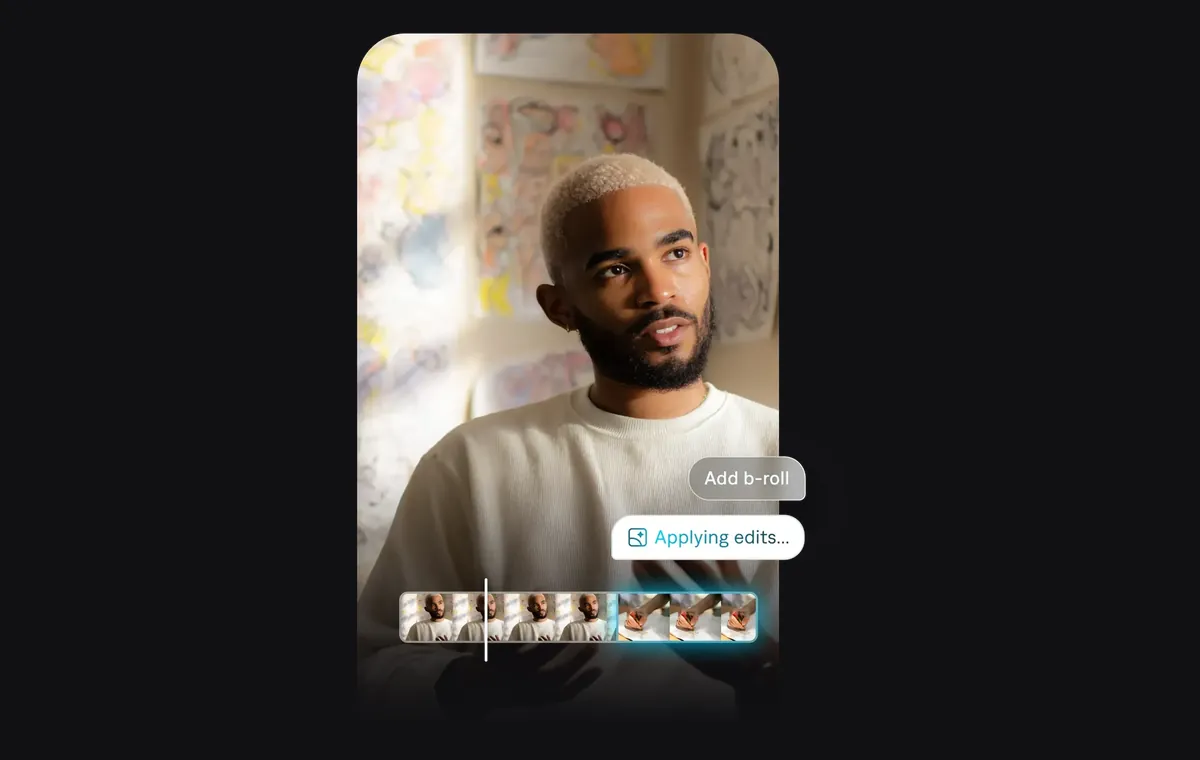 Captions' AI Edit: ask for B-roll on a talking-head clip and the edit is applied for you.
Where Captions' credits bite
1. The real features sit on Max and up. Basic ($9.99/month, 200 credits) covers eye contact, dubbing and the teleprompter. AI Edit, the chat editor, Clips, AI actors and AI Twins need Max at $24.99/month (500 credits). Faster generation and the top model tier are on Frontier at $69.99, $139.99 or $279.99/month (1,400 / 2,800 / 5,600 credits).
2. Credits go fast on video generation. Captions' own rate card prices Prompt to Video at 16 credits per 6 seconds, a 4-second Veo 3 clip at 64 credits, and an AI Edit at 10–40 credits. Credits are spent when you generate, whether or not you export.
3. Rollover is capped, and cancelling wipes it. Unused credits roll over on Basic and above, up to 3× the monthly allowance. Downgrading cuts your balance to the new plan's cap, and cancelling forfeits the whole balance at the end of the period.
4. You can't top up. "It is not possible to buy individual credits", except on Frontier 4x and legacy team plans. Run out mid-month and you upgrade or wait.
5. The free tier is narrow. It's 60–200 lifetime credits that never refresh. Any project using AI Edit, caption styles, eye contact or music needs a paid plan to export.
6. The best version is on iPhone. The web app lacks many manual tools, Android gets the Lite app, and projects are stored on the device and don't sync between devices.
Where Shorz is structurally different
- Credits never expire. 1 credit = €0.01. Packs at €19.90 / €99.90 / €199.90 (same numbers in USD) for 1,990 / 9,990 / 19,990 credits. No subscription, no rollover cap, nothing forfeited if you stop for a month, optional auto top-up. Your first pack carries a 7-day money-back guarantee.
- Clone yourself from one photo. The Avatar project lip-syncs a talking clone from a single photo plus a script (up to 6,000 words) or your own recorded audio. Choose Kling for speed or OmniHuman 1.5 for realism, and add up to 3 angle images for pose variety. Podcast puts two speakers in one conversation.
- Edit filmed footage from a brief. Auto Edit takes your talking-head clip and a plain-English brief ("cut the silences, zoom on the punchlines, B-roll every claim"). It returns captions with 16 word animations, speech- or beat-synced auto-zoom, five B-roll modes and face-tracked 16:9→9:16 reframing. Auto Edit and Clipping include 4 free videos a week, no watermark, no card.
- More languages. Narration in 90+ languages via ElevenLabs, and one-toggle dubbing of an existing video into ~108.
- Four more project types. Script to Video (a narrated video with consistent characters, nothing to film), Clipping (one long video into up to 8 shorts), Advertisement (product photo to multi-scene ad) and the Podcast type above.
- It publishes. Publish or schedule to YouTube, TikTok, Instagram, Facebook, X, LinkedIn, Threads and Pinterest, up to 30 days ahead, and read each post's engagement in the app. In Captions' docs we found export to your device, not publishing or scheduling.
- Your library stays on disk. Projects, clones, generated clips and thumbnails persist locally and are reusable.
- Agent-drivable. The Shorz MCP server lets Claude, Cursor, Codex or Gemini batch avatar videos and whole workflows in plain English.
Side by side
| Shorz | Captions | |
|---|---|---|
| Form factor | Desktop app for Windows and Apple Silicon Macs | iOS first; web app; Android Lite; Mac via web |
| Pricing model | Prepaid credits, no subscription | Monthly credit plans |
| Headline price | Packs from €19.90 / $19.90 (one-off) | Basic $9.99, Max $24.99, Frontier from $69.99 per month |
| Credit expiry | Never expire | Rollover capped at 3×; forfeited on cancel |
| Top-ups | Any time, any pack, optional auto top-up | Not available on most plans |
| Free option | 4 Auto Edit / Clipping videos a week, no watermark | 60–200 lifetime credits; AI features need a plan to export |
| Film on a phone, edit on the spot | No | Yes, its strongest card |
| AI eye contact / teleprompter | No | Yes |
| Talking clone of you | Avatar, from one photo + script or audio | AI Twin (Max and up) |
| Two-speaker conversations | Podcast project type | No dedicated type |
| AI edit of filmed footage | Auto Edit, from a written brief | AI Edit styles + chat editor (Max) |
| Dubbing | ~108 languages | ~30 languages |
| Script → narrated video, ads, clipping | Yes, separate project types | Prompt to Video, AI Ads, Clips |
| Publish / schedule | 8 platforms, up to 30 days ahead | Export to device |
| Project storage | Local library on disk | On device, no cross-device sync |
| API / automation | MCP server for AI agents | Mirage API (captions, avatar generation) |
Which one fits your work
Choose Captions if you film on your iPhone and want to finish and post from the same device, eye contact and a teleprompter matter to you, or you want a low monthly entry price for light, steady use. It's also the pick if you don't have a Windows PC or Apple Silicon Mac.
Choose Shorz if you produce on a computer and want a clone of yourself making videos without monthly credit pressure. It suits a weekly faceless series, a course presenter or ad variants in several languages. Shorz also fits if the deliverable includes two-speaker podcasts, narrated videos or clipped long-form, and you want it all published to eight platforms from one app.
The cost crossover. Captions is cheap to start and gets expensive once you need AI Twins and generation (Max and Frontier). Its balance is capped and lost on cancel. Shorz charges for what you generate, once, and keeps the balance.
Honest limits on the Shorz side
- No phone app. If your workflow starts and ends on an iPhone, Captions fits it and Shorz doesn't.
- No eye-contact correction or teleprompter. Shorz edits footage you bring. It doesn't help you film it.
- Windows and Apple Silicon Macs only. No Linux, Chromebook or Intel Mac build.
- Avatar generation needs credits from the first render. The free weekly videos cover Auto Edit and Clipping. Avatar video is the most credit-hungry type, at roughly 1,100 credits per minute by Shorz's own estimate.
- No team seats. Shorz is built for one operator.
Verdict
Captions is the better app for a creator who films on an iPhone and wants it polished in minutes. Shorz is the better choice for a creator who wants to stop filming: a clone from one photo, dubbed into ~108 languages, edited from a brief and published to eight platforms. It runs on credits that don't get capped, forfeited or reset.
See how the clone works: Clone yourself with Avatar
Other comparisons
Weighing more than one option is the sensible way to buy. The same research applied to the rest of the field: