

Descript changed how people edit spoken video: you edit the transcript like a document and the cut follows. Shorz takes a different route to the same goal, a finished video with less manual work. You describe the edit, or pick one of six project types, and the app builds it. The two overlap on talking-head editing, captions, AI voices and avatars. What decides the purchase is how you like to edit, how each one meters your usage, and what happens after export.
Descript details below were read from descript.com's pricing page and help center on 7 October 2026. Prices are USD. Check current numbers before you buy.
The one-line version
- Descript is a transcript-first editor for Mac, Windows and the browser, with a real multitrack timeline, remote recording, team collaboration and an AI co-editor called Underlord. It's billed per seat, with monthly allowances of media minutes and AI credits.
- Shorz is a desktop app for Windows and Apple Silicon Macs with six project types, on prepaid credits that never expire, with publishing to eight platforms built in.
What Descript is genuinely excellent at
- Editing by text. Delete a sentence in the transcript and it's gone from the video. For interviews, podcasts, courses and talking-head videos this is the fastest manual editing there is.
- A complete audio toolkit. Studio Sound cleans up a bad recording in one click. Filler-word removal, shortening word gaps, Remove Retakes and Regenerate (which patches a voice over an awkward cut) all sit next to it.
- Recording built in. Rooms records remote guests (up to 10 participants), plus a screen recorder and multitrack transcription with speaker detection.
- A real timeline. Layers, animations, transitions, layout packs and multicam, and on Creator and above you can export the timeline to Premiere Pro, Final Cut Pro, Pro Tools or Audition to keep editing there.
- Collaboration. Live collaboration and comments on every plan, shared drives, team seats, and Brand Studio on Business for templates across a team.
- AI voices and avatars. Custom voice clones, 25+ stock AI speakers (60+ on Business), 35+ stock avatars, caption translation into 61 languages and dubbing into 30.
- Runs almost anywhere. Desktop apps for macOS and Windows, plus a web version. It also has an API and an MCP connector for Claude and ChatGPT.
- 4K export on Creator and above.
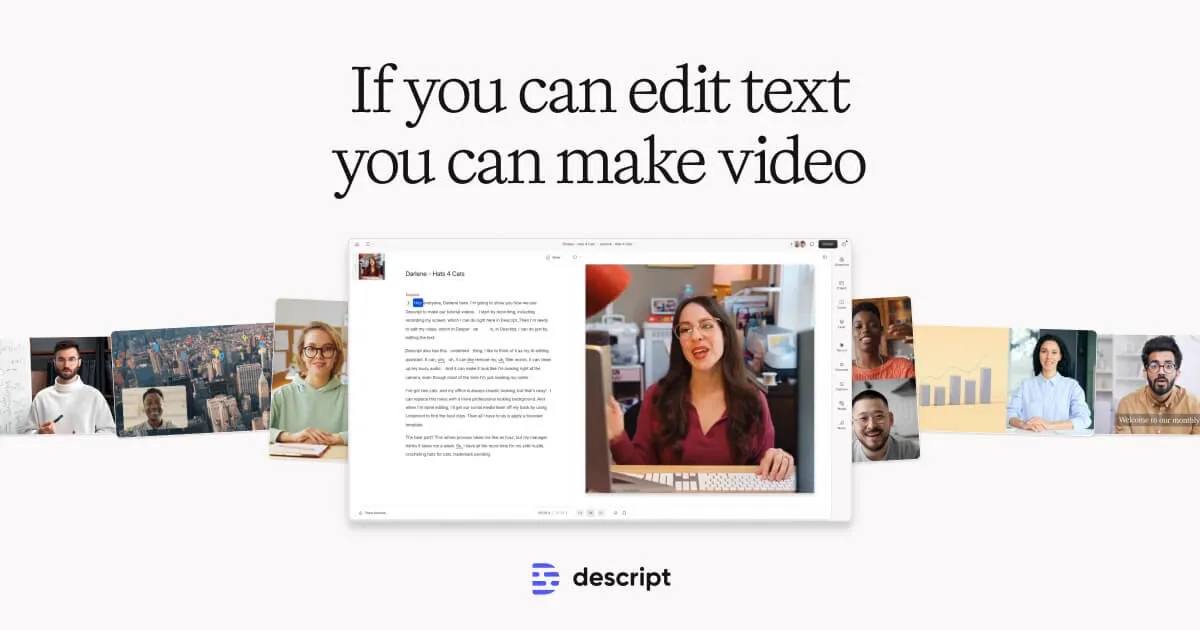 Descript's editor: edit the transcript like a text document and the video cuts follow, its signature transcript-first workflow.
Where Descript's pricing bites
1. The prices, and the monthly-billing premium. Hobbyist is $16 per person a month billed yearly ($192/yr) or $24 monthly. Creator is $24 yearly ($288/yr) or $35 monthly. Business is $50 yearly ($600/yr) or $65 monthly. Enterprise is custom. Paying month to month costs 30–50% more.
2. Two meters, both reset every month. Every plan includes media minutes (Hobbyist 10 hours, Creator 30, Business 40) and AI credits (400, 800 and 1,500). Media minutes are spent on everything you upload or record, whether you keep it or not, and each still image counts as one second. Descript's help center is plain about it: unused media minutes and AI credits don't roll over. The allowance resets at each renewal.
3. AI credit costs are hard to predict. Studio Sound and filler-word removal are capped at 30 credits per use. Underlord, the AI co-editor, isn't fixed: Descript says two similar requests can cost different amounts, and chatting with it uses credits even when no tool runs. When Underlord does run a tool, you pay for the "agent brain" and the tool both.
4. Top-ups cost more and expire. They're only on Creator and Business. AI credits cost $35 for 350 ($0.10 each), $80 for 1,000 or $200 for 4,000. Media time costs $25 for 5 hours, $80 for 20 or $150 for 50. Top-ups expire 12 months after purchase, are non-refundable, and can't be used if you drop to the Free plan.
5. It's per seat. Each Editor seat is a separate charge and adds to the shared pool. A three-person team on Creator is three times the number.
6. The free plan is a sampler. 60 media minutes a month, 100 AI credits once, 720p export with a watermark, 5 GB of storage.
7. Publishing stops at YouTube and podcast hosts. Descript exports to YouTube (web version only, channel owners only, and YouTube Shorts aren't supported), podcast hosts, Wistia and HubSpot. Its publishing docs list no TikTok, Instagram or scheduling queue.
8. Refund window: 48 hours after a plan invoice.
Where Shorz is structurally different
- Credits never expire. 1 credit = €0.01. Packs at €19.90 / €99.90 / €199.90 (same numbers in USD) for 1,990 / 9,990 / 19,990 credits. No subscription, no seats, no monthly reset. A quiet month costs nothing and the balance waits. Your first pack comes with a 7-day money-back guarantee.
- One balance, no media-minute allowance. Importing footage doesn't use up an allowance. Transcription costs about 1 credit (€0.01) a minute, and AI work is billed from the same balance, with no separate top-up prices.
- A free tier that recurs. Auto Edit and Clipping include 4 free videos a week: full quality, no watermark, no card, sources up to 30 minutes. Cuts, filler-word and silence removal, subtitles, zooms and titles are all included.
- Describe the edit instead of doing it. Auto Edit takes any footage and a plain brief ("tighten this to 60 seconds, cut the ums, add captions and B-roll") and renders the finished video with cuts, subtitles, B-roll, auto-zoom and titles applied.
- Six entry points, not one editor. Auto Edit, Script to Video (a narrated video with consistent characters and nothing to film), Avatar, two-speaker Podcast, Advertisement, and Clipping (one long video becomes up to 8 captioned shorts).
- Languages. Narration in 90+ languages through ElevenLabs voices, and dubbing into ~108 languages with one toggle, versus 30 dubbing languages on Descript. Dubbing is the most expensive minute in Shorz (about 286 credits a minute), so it's for videos that earn it.
- It publishes and schedules. Publish or schedule to YouTube, TikTok, Instagram, Facebook, X, LinkedIn, Threads and Pinterest, up to 30 days ahead, and read each post's engagement in the app. Vertical Shorts included.
- Local rendering and a local library. The final render runs GPU-accelerated on your machine. Projects and generated assets stay on disk, so there's no cloud storage cap.
- Agent-drivable. The Shorz MCP server lets Claude, Cursor, Codex or Gemini run whole workflows in plain English, from importing a video to scheduling the post.
Side by side
| Shorz | Descript | |
|---|---|---|
| Form factor | Desktop app for Windows and Apple Silicon Macs | Desktop (Mac, Windows) + web |
| Pricing model | Prepaid credits, no subscription, no seats | Per-seat subscription |
| Headline price | Packs from €19.90 / $19.90 (one-off) | $16 / $24 / $50 per person/mo billed yearly |
| Monthly billing | Not applicable | $24 / $35 / $65 per person/mo |
| Usage meters | One credit balance | Media minutes + AI credits |
| Expiry | Credits never expire | Monthly allowance resets; top-ups expire after 12 months |
| Free tier | 4 Auto Edit / Clipping videos a week, no watermark, no card | 60 min/mo, 100 AI credits once, 720p, watermark |
| Refund | 7-day money-back guarantee on the first pack | 48 hours after a plan invoice |
| How you edit | Describe the edit; AI renders it | Edit the transcript; multitrack timeline |
| Filler-word / silence removal | Yes, in Auto Edit (free tier included) | Yes, AI credits |
| Project types | 6 distinct entry points | One editor + Underlord AI co-editor |
| Long video → shorts | Clipping, up to 8 clips, link or file | Create Clips, AI credits |
| Script → narrated video | Script to Video, consistent characters | AI video maker + AI speech |
| Avatars | Avatar + two-speaker Podcast types | Stock and custom avatars |
| Dubbing | ~108 languages | 30 languages |
| Recording | No recording studio | Rooms, screen recorder |
| Team collaboration | No seats or shared editing | Live collaboration, comments, seats |
| Timeline export to an NLE | No | Premiere, Final Cut, Pro Tools, Audition (Creator+) |
| Publish / schedule | 8 platforms, up to 30 days ahead | YouTube (no Shorts), podcast hosts, Wistia, HubSpot |
| API / automation | MCP server for AI agents | API, MCP connector, Zapier |
| Rendering | Local, GPU-accelerated | Cloud projects, local and web-link export |
Which one fits your work
Choose Descript if you edit long spoken content by hand and want to see every word: podcasts, interviews, courses, webinars. It also suits you if you record guests remotely, need the audio polish of Studio Sound, hand timelines to Premiere or Pro Tools, or work in a team that comments on the same project. On Linux or a Chromebook, its web version runs where Shorz can't.
Choose Shorz if you'd rather describe the edit than make it, and your output is short-form at volume: a faceless channel, client social posts, ad variants, podcast clips. It fits if the same week includes a narrated Short, an avatar explainer and a product ad. It also fits if you want the finished video posted to eight platforms, not left in a downloads folder. Four free Auto Edit or Clipping videos a week let you test it before you pay.
The cost crossover. Descript bills every seat every month and resets what you didn't use. Creator billed monthly is $420 a year per seat whether you publish or not. Shorz bills for what you generate, once, and keeps the rest. Steady daily editing of long recordings by a team suits Descript. Bursty or irregular output, especially short-form, suits Shorz.
Honest limits on the Shorz side
- Windows and Apple Silicon Macs only. No web version, no Linux or Intel Mac build.
- No transcript editing and no multitrack timeline. You steer the edit with a brief and adjust settings, not by deleting words or dragging clips. If you need word-level manual control, Descript is the better tool.
- No recording studio. There's no remote guest recording or screen recorder; Shorz starts from footage you already have, or from a script.
- No team seats, shared projects or comments. Shorz is built for one operator.
- No NLE handoff. It doesn't export timelines to Premiere, Final Cut or Pro Tools.
- The free tier is narrow. Only Auto Edit and Clipping are free; Script to Video, Avatar, Podcast and Advertisement need credits from the first render.
Verdict
Descript is the better choice for hands-on editors of long spoken content, and for teams that record, edit and review together. Shorz is the better choice for an operator who wants finished short-form video out the door without a monthly meter. You get credits that never expire, no seats, six project types, and publishing to eight platforms from the same app.
If you'd rather describe the cut than make it, see how Auto Edit works: AI Auto Edit
Also worth reading: Best Descript Alternatives.
Other comparisons
Weighing more than one option is the sensible way to buy. The same research applied to the rest of the field: