

Submagic made the bold, word-by-word caption look a one-click job, and most talking-head Shorts you scroll past today owe something to that style. Shorz does captions too, inside a bigger edit. So the question is whether you want a caption-and-polish tool for clips you already filmed, or an app that edits, generates and publishes the whole video.
Submagic details below were read from submagic.co's pricing page, help center and terms on 7 October 2026 (USD; the same plans are listed in EUR). Check current numbers before you buy.
The one-line version
- Submagic is a browser-based short-form finisher. It adds animated captions, cuts silences and bad takes, auto-zooms and adds B-roll and hook titles. It's priced by how many videos you make a month.
- Shorz is a desktop app for Windows and Apple Silicon Macs. Its Auto Edit does that finishing from a plain-English brief, and five more project types make videos you never filmed. It runs on prepaid credits that never expire and publishes to eight platforms.
What Submagic is genuinely excellent at
- The caption look. A library of named animated caption templates (Hormozi, Ali, Jason and more), with emoji and keyword highlights. If "the Submagic style" is the brief, Submagic is the shortest route to it.
- Accuracy tooling. A custom dictionary for names and jargon, plus highlighting of words it's unsure about so you can check them before export.
- One-click polish. AI Auto Edit applies captions, B-roll, transitions and zooms at once. Silence and bad-take removal, clean audio, eye-contact correction, hook titles and auto descriptions sit one toggle away.
- Magic Clips. Turns a long video into 20+ short clips, sold as an add-on.
- Simple onboarding. Upload a file, or paste a YouTube or Google Drive link, and you're working. No install, any OS.
- Integrations. A REST API plus Zapier, Make, n8n and Google Drive, and direct publishing to TikTok, Instagram and YouTube Shorts on Pro and up.
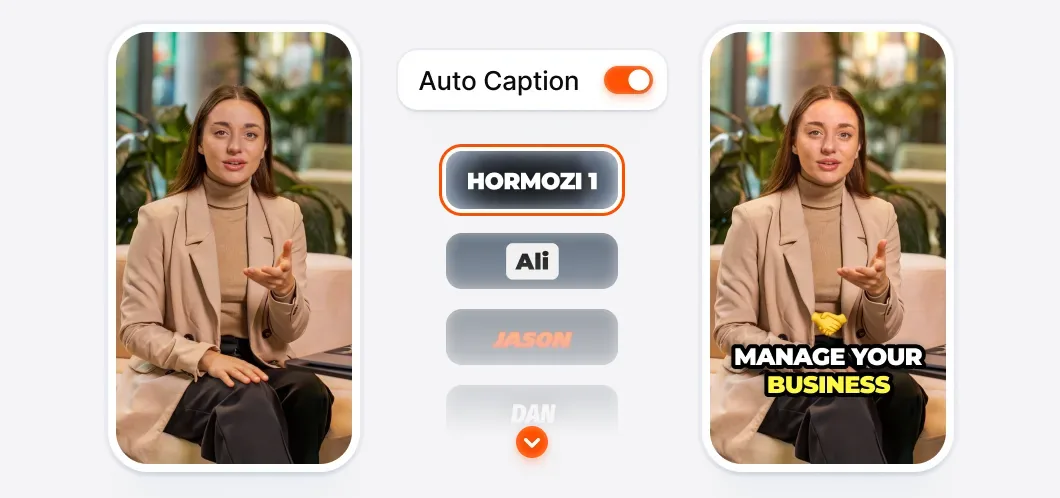 Submagic's caption picker: one toggle, then a named animated style. This is the look the product is known for.
Where Submagic's pricing bites
1. You buy videos, with a length cap. Starter is $19/month ($12 billed yearly) for 15 videos of up to 2 minutes. Pro is $39 ($23 yearly) for 40 videos of up to 5 minutes. Business is $69 ($41 yearly) for 100 videos of up to 30 minutes. A 6-minute YouTube cut needs Business.
2. The good features are tiered. Auto-zoom, silence and bad-take removal, clean audio, publishing and the Brand Kit start at Pro. 4K/60fps and publishing from several accounts per platform start at Business. Starter exports 1080p at 30fps.
3. No refunds. Submagic's terms say "All monthly and annual fees are non-refundable". The free trial is 3 short videos, and you need a subscription to download them without a watermark.
4. Translation is subtitles only. Submagic translates captions. Its translator page says it "isn't robotic voice cloning", and we found no AI dubbing.
5. Allowances are monthly. Plans are framed as videos per month, and Submagic doesn't document unused videos rolling over, so treat a quiet month as spent.
Where Shorz is structurally different
- Credits never expire. 1 credit = €0.01. Packs at €19.90 / €99.90 / €199.90 (same numbers in USD) for 1,990 / 9,990 / 19,990 credits. No subscription, no monthly video count, and no length tier between you and a 6-minute video. Your first pack carries a 7-day money-back guarantee.
- A real free tier. Auto Edit and Clipping include 4 free videos a week: full quality, no watermark, no card.
- The edit, not just the captions. Drop in footage and describe what you want: "cut the silences and filler words, zoom on the punchlines, B-roll every claim". Auto Edit plans and renders it. Captions come with deep styling, highlight-spoken-word mode and 16 word animations. Auto-zoom syncs to speech or to the music beat from a 16-effect pool. Face tracking keeps the speaker centred when 16:9 becomes 9:16.
- Five B-roll modes. Your own assets, auto-pulled web images, GIFs, emojis, or AI-generated stills and clips, each with its own in/out transition pool.
- Dubbing, not just subtitles. One toggle dubs the voice into ~108 languages.
- Videos you didn't film. Script to Video builds a narrated video with consistent characters from a script alone. Avatar and two-speaker Podcast make talking-head videos without a camera, and Advertisement turns a product photo into a multi-scene ad. Clipping turns one long video into up to 8 captioned shorts.
- It publishes everywhere, not just to three platforms. Publish or schedule to YouTube, TikTok, Instagram, Facebook, X, LinkedIn, Threads and Pinterest, up to 30 days ahead, and read each post's engagement in the app.
- Thumbnails. A 16:9 and 9:16 thumbnail generator is built in.
- Agent-drivable. The Shorz MCP server lets Claude, Cursor, Codex or Gemini run whole workflows in plain English.
Side by side
| Shorz | Submagic | |
|---|---|---|
| Form factor | Desktop app for Windows and Apple Silicon Macs | Browser, any OS (no mobile app) |
| Pricing model | Prepaid credits, no subscription | Subscription, videos per month |
| Headline price | Packs from €19.90 / $19.90 (one-off) | $19 / $39 / $69 per month ($12 / $23 / $41 yearly) |
| Credit expiry | Never expire | Monthly allowance, no documented rollover |
| Video length limit | No plan tier caps it | 2 / 5 / 30 minutes by plan |
| Free option | 4 Auto Edit / Clipping videos a week, no watermark | 3-video trial, watermarked |
| Refunds | 7-day money-back guarantee on your first pack | Non-refundable |
| Animated caption templates | Deep styling, 16 word animations | Large named-template library, its strongest card |
| Silence / filler removal | Yes, from the brief | Yes, Pro and up |
| Auto-zoom | Speech- or beat-synced, 16 effects | Yes, Pro and up |
| B-roll | 5 modes incl. AI-generated clips | Stock B-roll (Storyblocks on Pro+) |
| Dubbing | ~108 languages | Subtitle translation only |
| Script → narrated video, avatars, ads | Yes, separate project types | AI avatar actors |
| Long video → shorts | Clipping, up to 8 clips | Magic Clips add-on, 20+ clips |
| Publish / schedule | 8 platforms, up to 30 days ahead | TikTok, Instagram, YouTube Shorts (Pro+) |
| Rendering | Local, GPU-accelerated | Cloud, priority on Business |
Which one fits your work
Choose Submagic if you film your own talking-head clips and the deliverable is that clip with great captions, fast, in a browser. It also fits if a specific template look is what your audience expects, you're on Linux or a Chromebook, or your clips sit comfortably under the length cap of the plan you'd buy.
Choose Shorz if captions are the last step of a bigger job, such as faceless narration, client podcasts, ads or multi-language versions. Shorz also fits if your videos run longer than 5 minutes, you want the voice dubbed rather than the subtitles translated, or you want the finished video posted to eight platforms without a per-month count running down.
Honest limits on the Shorz side
- Windows and Apple Silicon Macs only. No browser version and no Linux, Chromebook or Intel Mac build.
- No named caption-template marketplace. You style captions with panel controls and briefs. If you want an exact branded template look in one click, Submagic is quicker.
- No transcript editor or confidence highlighting. Spelling of names and brand terms is steered from the brief, not by clicking flagged words.
- No team workspace. Shorz is built for one operator.
- AI generation (Script to Video, avatars, AI B-roll) needs credits from the first render. The free weekly videos cover Auto Edit and Clipping.
Verdict
Submagic is the better tool when the job is "make this clip I filmed look like a viral Short" and the clip is short. Shorz is the better choice when the job is the video, not just the captions: the edit, the visuals, the voice in other languages, and the post on eight platforms. It all runs on credits that never expire.
See what Auto Edit does with raw footage: Auto Edit
Other comparisons
Weighing more than one option is the sensible way to buy. The same research applied to the rest of the field: