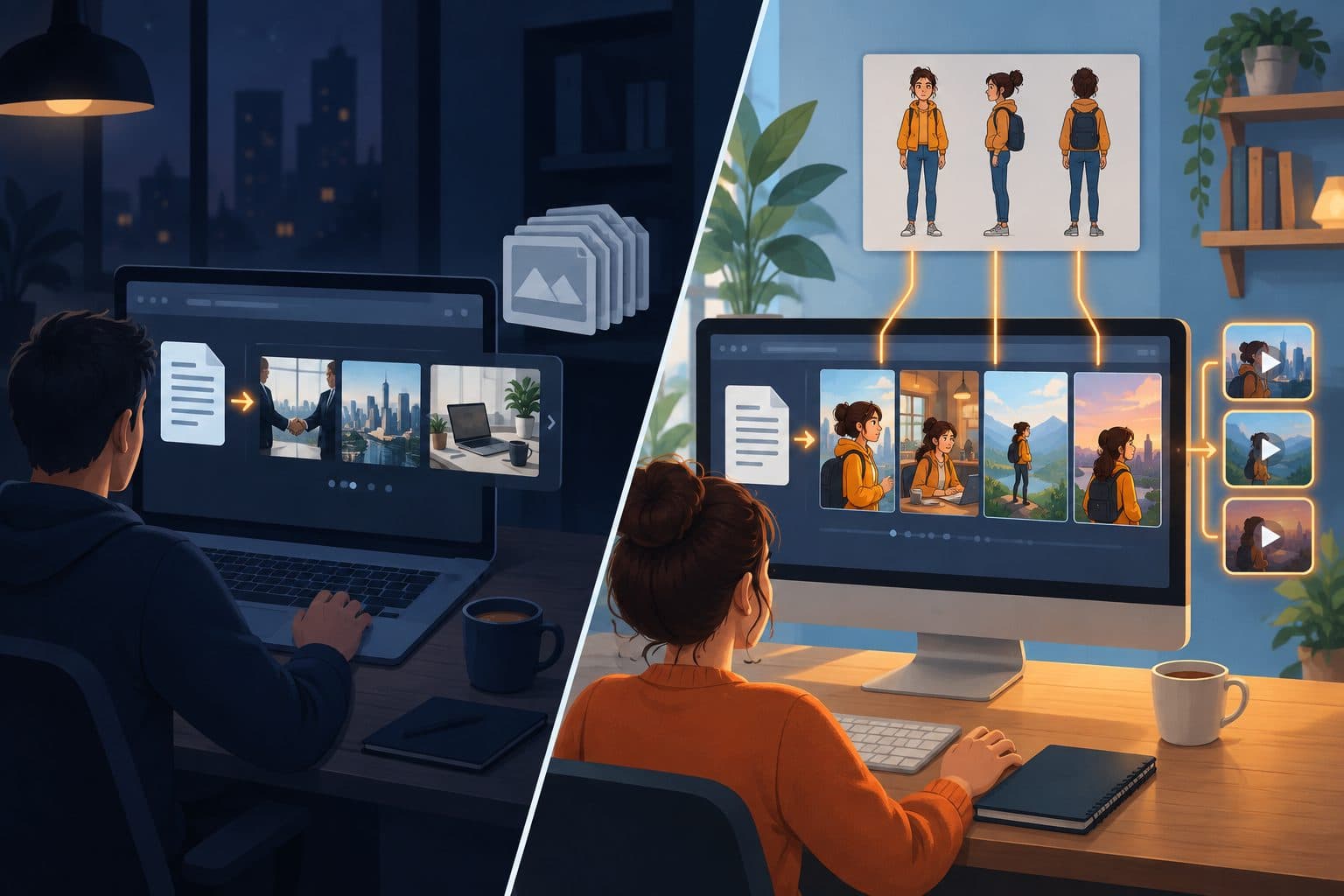

Pictory and Shorz start from the same input, words, and end with the same output, a narrated video. The difference is where the pictures come from. Pictory matches each sentence to a clip from a large stock library. Shorz generates the visuals for the script, and can hold the same character and look across every scene. After that, the deciding factors are how the plan meters you and what happens once the video is rendered.
Pictory details below were read from pictory.ai's pricing page and help center on 7 October 2026 (USD). Check current numbers before you buy.
The one-line version
- Pictory is a browser-based text-to-video tool that pairs your script, article, slides or PDF with stock footage from Getty and Storyblocks. It's billed in video minutes a month.
- Shorz is a desktop app for Windows and Apple Silicon Macs whose Script to Video project builds a narrated, storyboarded video from AI-generated images or clips with consistent characters. It runs on prepaid credits that never expire and publishes to eight platforms.
What Pictory is genuinely excellent at
- Almost any input. Text, a script, a prompt, a URL or blog post, PowerPoint, PDFs and documents, audio, images, screen and camera recordings, or an existing video.
- A huge licensed stock library. 18 million Getty and Storyblocks clips on Professional and Team, and 5 million on Starter, plus thousands of music tracks. For corporate, educational and explainer topics, real stock footage is often exactly right.
- Edit video by editing text. Change the transcript and the video follows, which is handy for webinars and recorded talks. It also does highlight reels and summaries of long videos.
- Built for training teams. Brand kits, a shared Team workspace, and on Enterprise SSO, SCORM export and hosted interactive video.
- Automation. A paid API (from $99/month) plus Zapier, Make and n8n.
- Runs anywhere. Any desktop browser, nothing to install.
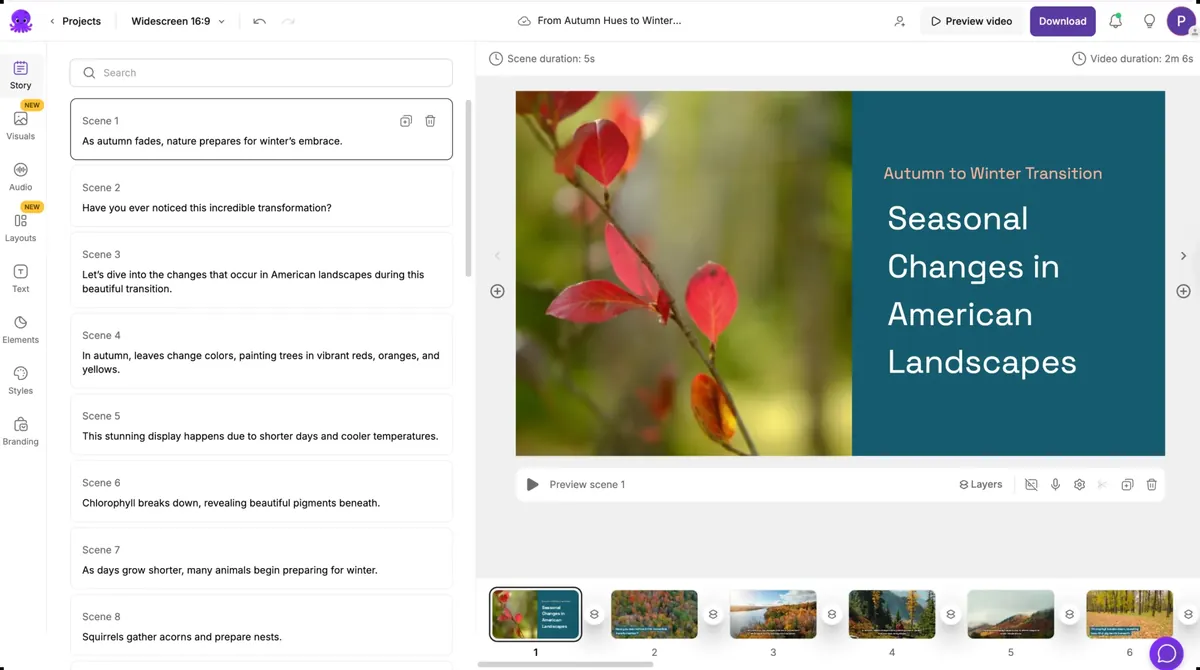 Pictory's storyboard editor: each script scene is matched to a stock clip and a text layout.
Where Pictory's pricing bites
1. Minutes reset on the 1st. Pictory's own FAQ says unused video minutes don't carry over: "Your quota is reset on the first of every month." Yearly plans grant the whole year upfront. AI credits do roll over, but only while you stay subscribed.
2. The prices. Starter is $29/month ($25 billed yearly) for 200 video minutes, 100 AI credits and 60 ElevenLabs voice minutes. Professional is $59 ($35 yearly) for 600 minutes and 500 AI credits. Team is $199 ($119 yearly) for 1,800 minutes with 3+ seats. Enterprise is custom. Custom avatars and voice cloning start at Professional.
3. No refunds, and cancelling deletes your projects. Pictory's FAQ says it doesn't refund paid subscriptions and that projects are permanently deleted on cancellation.
4. The trial is watermarked. 14 days, 3 projects, 15 video minutes, 720p, with a watermark on downloads. There's no ongoing free tier.
5. Stock looks like stock. The most consistent complaint in third-party reviews is that matched clips can be generic or too literal, like an "email open rates" line illustrated with paper mail. For a branded series or a recurring character, a stock library can't hold one face across scenes.
6. The video ends at download. Pictory exports 16:9, 9:16 and 1:1 files. We found no built-in scheduler.
Where Shorz is structurally different
- Credits never expire. 1 credit = €0.01. Packs at €19.90 / €99.90 / €199.90 (same numbers in USD) for 1,990 / 9,990 / 19,990 credits. No monthly reset, no subscription to keep alive, and nothing deleted if you stop buying. Your first pack carries a 7-day money-back guarantee.
- Visuals made for your script. Script to Video can use your own imported clips, generated images or generated video for every scene, with the image or video model of your choice. Shorz's own estimate for a faceless narrated video is roughly 185 credits (€1.85) per minute.
- The same character in every scene. Typed references hold the look: Style (0–3),
named Characters (0–4, each with an auto-generated turnaround sheet) and
Environments (0–4). A recurring host or mascot looks the same in scene 1 and scene
- ElevenLabs narration in 90+ languages, thousands of voices or your own recorded narration, with every word auto-captioned.
- Five more project types. Auto Edit (edit your footage from a brief), Avatar (a talking clone from one photo), two-speaker Podcast, Advertisement, and Clipping (one long video into up to 8 captioned shorts). Auto Edit and Clipping include 4 free videos a week, no watermark, no card.
- It publishes. Publish or schedule to YouTube, TikTok, Instagram, Facebook, X, LinkedIn, Threads and Pinterest, up to 30 days ahead, and read each post's engagement in the app.
- A local library. Projects, generated images, clips and thumbnails stay on your disk and are reusable, so you don't pay to generate the same character twice.
- Agent-drivable. The Shorz MCP server lets Claude, Cursor, Codex or Gemini write the scripts, set the models, render and upload a whole series in plain English.
Side by side
| Shorz | Pictory | |
|---|---|---|
| Form factor | Desktop app for Windows and Apple Silicon Macs | Browser (desktop); no mobile app |
| Pricing model | Prepaid credits, no subscription | Subscription, video minutes per month |
| Headline price | Packs from €19.90 / $19.90 (one-off) | $29 / $59 / $199 per month ($25 / $35 / $119 yearly) |
| Unused allowance | Never expires | Minutes reset on the 1st; credits roll over while subscribed |
| Free option | 4 Auto Edit / Clipping videos a week, no watermark | 14-day trial, 720p, watermarked |
| Refunds | 7-day money-back guarantee on your first pack | No refunds; projects deleted on cancel |
| Script → video visuals | AI-generated images or video, or your own clips | Getty + Storyblocks stock (5M–18M clips) |
| Consistent characters across scenes | Yes, typed references + turnaround sheets | No |
| Inputs | Script, your footage, photos, long-video links | Text, URL/blog, PPT, PDF, audio, video |
| Edit by transcript | No, plain-language briefs | Yes |
| Narration | ElevenLabs, 90+ languages | ElevenLabs minutes by plan + standard voices |
| Talking avatars | Avatar + two-speaker Podcast types | Stock avatars; custom from Professional |
| Dubbing an existing video | ~108 languages | Not a headline feature |
| Publish / schedule | 8 platforms, up to 30 days ahead | Export files |
| Team / LMS features | No seats or SCORM | Team workspace; SSO + SCORM on Enterprise |
| API / automation | MCP server for AI agents | API from $99/mo, Zapier, Make, n8n |
Which one fits your work
Choose Pictory if your source material is articles, slide decks, PDFs or recorded webinars, and licensed stock footage is the right visual language: corporate training, internal comms, explainers. Pictory also fits if you need SCORM or a shared team workspace, or you want to edit a talk by editing its transcript.
Choose Shorz if you're making a series that needs its own look: a faceless channel, a story format, a recurring character or mascot, product explainers in your brand style. Shorz also fits if you want visuals generated for the script rather than matched from a library, and you want the video published to eight platforms instead of exported. Your credits stay usable after a quiet month.
The cost crossover. Pictory is cheap per minute of stock-footage video if you use your full allowance every month. Shorz costs more per minute when every scene is generated, but nothing resets, and the visuals belong to your video instead of the library everyone else draws from.
Honest limits on the Shorz side
- No stock-footage library. If licensed real-world footage is what the topic needs, Pictory has 18 million clips and Shorz doesn't sell one.
- No URL, slide or PDF import. Script to Video starts from a script. Turning an article into one is a step you or your AI agent do first.
- Generated video costs more than stock. Every AI scene is billed, and AI video more than AI stills.
- Windows and Apple Silicon Macs only. No browser version, no Linux, Chromebook or Intel Mac build.
- No team seats or LMS export. Shorz is built for one operator.
Verdict
Pictory is the better choice for teams turning documents and slides into stock-footage training and explainer videos at a predictable monthly price. Shorz is the better choice when the video needs its own visuals, such as a recurring character, a consistent style or a faceless series. It suits you if you want those videos published, not just exported, on credits that never reset.
See the Script to Video workflow: Script to Video
Other comparisons
Weighing more than one option is the sensible way to buy. The same research applied to the rest of the field: