

VEED and Shorz overlap more than most pairs on this site: both do subtitles, translation, AI generation, avatars and finishing. The differences that actually decide the purchase are structural — where it runs, how the credits behave, and whether the tool publishes the video.
VEED pricing below was read from veed.io's own pricing page in July 2026 (EUR, region-dependent). Check current numbers before you buy.
The one-line version
- VEED is a browser-based, per-seat, collaborative editor with a broad AI toolbox and a real free tier. Great for teams that need shared access from any OS.
- Shorz is a desktop suite for Windows and Mac with six project types, prepaid credits that never expire, local GPU rendering, and publishing to eight platforms.
What VEED is genuinely excellent at
- It runs anywhere. Any browser, any OS — Mac, Linux, Chromebook, a locked-down work laptop. Nothing to install. Shorz can't match this today.
- Collaboration. Team workspaces, multiple brand kits, review mode for stakeholder comments, centrally managed teams and data on the upper plans. If three people touch every video, that's worth paying for.
- Subtitles and translation at scale. Unlimited auto-subtitles on paid plans and translation into 50+ languages, plus a large AI voice allowance (VEED advertises up to 12 hours a month on Pro, up to 80 on Studio).
- A genuinely broad toolbox. Text-to-video, AI avatars, dubbing, image generation, background and noise removal, eye-contact correction, a teleprompter, and a stack of API endpoints (Lip Sync, Subtitle, Background Removal, Green Screen).
- A free tier. 10-minute videos, 720p, watermarked — enough to evaluate it.
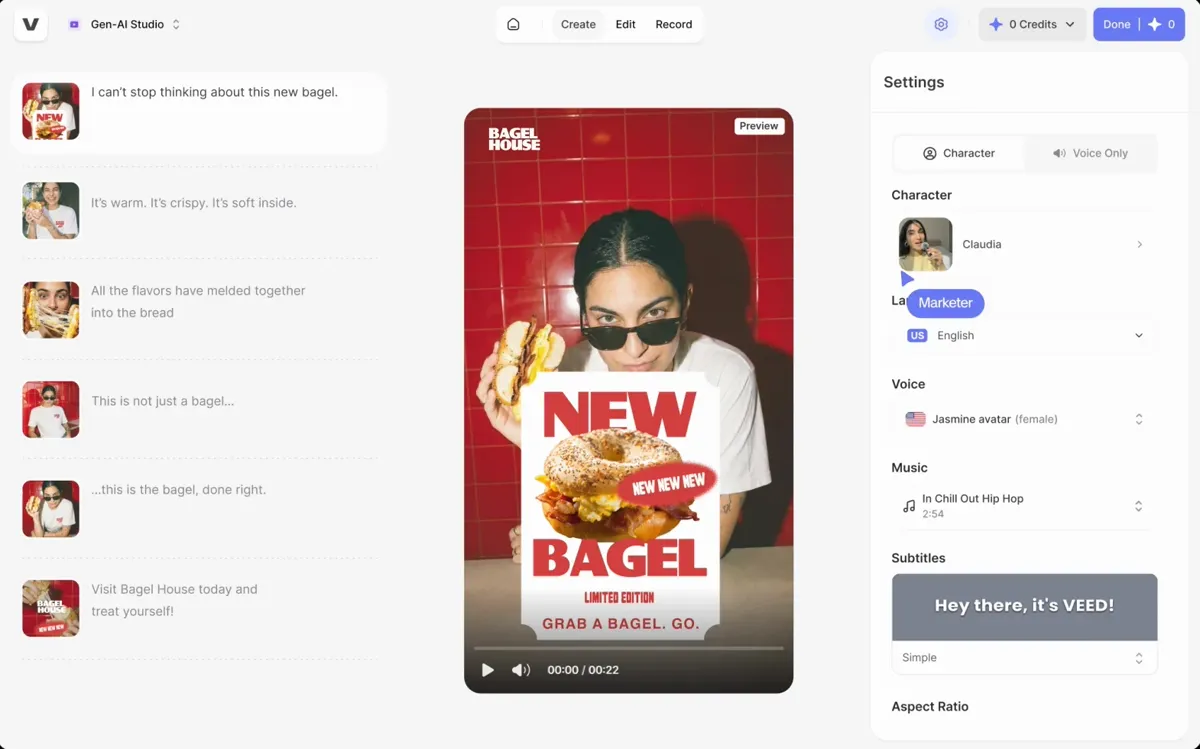 VEED's Gen-AI Studio — avatar, voice, music and subtitle controls in a single browser-based generation panel.
Where VEED's pricing bites
This is the part worth reading carefully, because VEED's headline prices and its real prices are very different numbers.
1. Monthly billing costs roughly double. On veed.io today: Creator is €11 per user/month billed yearly (€129/yr) — but €22 per user/month if you pay monthly. Pro is €23 yearly vs €47 monthly. Studio is €37 yearly vs €76 monthly. Committing to a year isn't so much a discount as monthly being penalised roughly 2×.
2. Credits expire. VEED's own help documentation states unused monthly credits expire at the end of each month, and annual credits expire at year-end. If your Pro plan's 30,000 annual credits are half-used when the year rolls over, the rest are gone.
3. It's per seat. Every price above is per user. A three-person team on Pro is three times the number.
4. Credits go fast on generative work. Creator's allowance is 500 credits/month (6,000/year) — VEED estimates ~100 AI videos, but that estimate assumes cheap operations. Reviewers have reported single image-to-video generations consuming several hundred credits.
5. Rendering happens in a queue you share. Browser-based means someone else's servers. Reported render throughput scales with your plan tier, free and lower tiers process on shared infrastructure, and users cite slowdowns with large files and 4K exports at peak times.
6. No multi-platform publishing. VEED finishes the file. Scheduling to your channels is another tool.
Where Shorz is structurally different
- Credits never expire. 1 credit = €0.01. Packs at €19.90 / €99.90 / €199.90 for 1,990 / 9,990 / 19,990 credits. No subscription, no renewal date, no seats, optional auto top-up, one balance across every tool, full commercial rights. Buy €19.90 of credits, use them over eight months, nothing lapses.
- Rendering is local and GPU-accelerated. The final composite runs on your machine, so throughput is your hardware rather than your plan tier — and there's no priority upsell.
- Six entry points, not one editor. Auto Edit Video, Script to Video, Avatar, Podcast, Advertisement, Clipping.
- Clipping. One long video — local file or a YouTube, TikTok, Facebook or Instagram link — becomes up to 8 post-ready clips with captions and B-roll applied.
- Advertisement. A product photo and/or a person photo plus a brief becomes a storyboard-driven multi-scene ad, 10–40 seconds in 10-second scenes.
- Character consistency for scripted video. Typed references — Style (0–3), named Characters (0–4, each with an auto-generated turnaround sheet), Environments (0–4) — hold the same character and look across every scene of a narrated video.
- Deeper finishing. Speech-synced or beat-synced auto-zoom with a 16-effect pool, face tracking for 16:9→9:16 reframing, five B-roll modes with separate in/out transition pools, animated titles that write themselves from the transcript, animated borders, overlay FX, AI music and SFX, a channel mixer with reverb presets, and a 16:9 / 9:16 thumbnail generator.
- It publishes. Render once, then publish or schedule to YouTube, TikTok, Instagram, Facebook, X, LinkedIn, Threads and Pinterest, up to 30 days ahead, and read per-post engagement in the app.
- Local asset library. Projects, generated videos, images, thumbnails and audio persist on disk and are reusable, so you don't re-pay to regenerate work you already have.
- Agent-drivable. An MCP server lets Claude, Cursor, Codex or Gemini run whole workflows in plain English.
Side by side
| Shorz | VEED | |
|---|---|---|
| Form factor | Desktop app for Windows and Apple Silicon Macs | Browser, any OS |
| Pricing model | Prepaid credits, no subscription, no seats | Per-seat subscription |
| Headline price | Packs from €19.90 (one-off) | €11 / €23 / €37 per user/mo billed yearly |
| Monthly-billing penalty | None | ~2× (€22 / €47 / €76 per user/mo) |
| Credit expiry | Never expire | Monthly credits expire monthly; annual at year-end |
| Free tier | 4 Auto Edit / Clipping videos a week — full quality, no watermark | Yes — 720p, 10 min, watermarked |
| Watermark | Never | On the free tier |
| Rendering | Local, GPU-accelerated, your hardware | Cloud queue, throughput by plan tier |
| Project types | 6 distinct entry points | One editor + AI tool suite |
| Long-video → shorts | Clipping, up to 8 clips, link or file | Manual |
| Script → narrated video, consistent characters | Yes | Text-to-video, no turnaround-sheet system |
| Talking avatars | Avatar + two-speaker Podcast types | AI Avatars |
| Ad generation | Advertisement type, multi-scene storyboard | No dedicated flow |
| Subtitles | Deep styling, 16 word animations | Unlimited auto-subtitles |
| Translation / dubbing | ~108 languages | 50+ languages |
| Team collaboration | No seats or review mode | Brand kits, review mode, team management |
| Thumbnails | 16:9 + 9:16 generator | No |
| Publish / schedule | 8 platforms, up to 30 days ahead | No |
| API / automation | MCP server for AI agents | Public API endpoints |
Which one fits your work
Choose VEED if you're on Linux, a Chromebook or an Intel Mac, you need several people editing and reviewing the same videos, subtitles and 50+ language translation are the core job, or you want to try before you pay. Its collaboration and cross-platform reach are real advantages Shorz does not have.
Choose Shorz if you're a solo operator or small team on Windows or an Apple Silicon Mac shipping volume: a faceless channel, a client retainer, ad variants, podcast repurposing. You want credits that sit in your account until you need them, rendering that's as fast as your machine, and the video actually posted to eight platforms rather than downloaded to a folder.
The cost crossover is straightforward. VEED bills per seat per month whether you publish or not. Shorz bills for what you generate, once. Bursty and irregular output favours Shorz; steady multi-seat collaboration favours VEED.
Honest limits on the Shorz side
- Windows and Apple Silicon Macs only. No Linux, Chromebook or Intel Mac build; VEED runs in any browser — a decisive advantage on those machines.
- The free tier is narrow. Auto Edit and Clipping include 4 free videos a week (clean, full-quality exports); AI generation — Text-to-Video, avatars, AI b-roll — needs credits from the first render.
- No team seats, shared workspaces or review mode. Shorz is built for an operator, not a committee. If stakeholders comment on timecodes, VEED wins.
- No unlimited-anything. Heavy generative use costs more as you use more; a flat seat can be cheaper at very high volume with light AI use.
- Being a desktop app, it wants a reasonably capable Windows PC or Apple Silicon Mac.
Verdict
VEED is the better choice for a browser-based, multi-seat team that lives in subtitles and translation. Shorz is the better choice for an operator who wants volume out the door without a meter running: credits that never expire, no seats, local rendering, and publishing to eight platforms built in.
If expiring credits and per-seat billing are what's actually bothering you, that's the difference to look at: AI Video Editor for Faster Production
Also worth reading: Best VEED Alternatives.
Other comparisons
Weighing more than one option is the sensible way to buy. The same research applied to the rest of the field: