

Kapwing is where a team goes to edit together: a shared workspace in the browser, templates, comments and brand kits, with an AI toolbox on top. Shorz is built for the opposite situation. One operator describes the video, and the app assembles it and posts it. So the first question isn't features. It's how many people touch each video, and second, whether you want a timeline or a brief.
Kapwing details below were read from kapwing.com's pricing page and help center on 7 October 2026 (USD, per member). Check current numbers before you buy.
The one-line version
- Kapwing is a browser-based, per-member editor with real-time collaboration, templates and brand kits, and AI tools that draw on a monthly credit allowance.
- Shorz is a desktop app for Windows and Apple Silicon Macs with six project types, prepaid credits that never expire, no seats, and publishing to eight platforms built in.
What Kapwing is genuinely excellent at
- Editing together. A shared workspace with commenting, real-time collaboration and team invites, plus Brand Kits with custom fonts. If a producer, an editor and a client all touch the same video, that's the core of the product.
- Templates and an approachable editor. It's easy to pick up in a browser and has a template library to start from. Reviews consistently praise how quickly non-editors get productive.
- Subtitles at volume. Auto-subtitles in 100+ languages, with 1,000 subtitle minutes a month on Pro.
- Free tools that don't cost credits. Smart Cut (silence removal), background removal and several other tools use no credits at all.
- Repurpose Studio. Turns one video, an upload or a YouTube link up to 3 hours long, into multiple clips.
- Wide dubbing coverage. 149 language options (110 base languages plus regional dialects), and voice cloning on Business.
- Runs anywhere. Any OS with a browser, nothing to install.
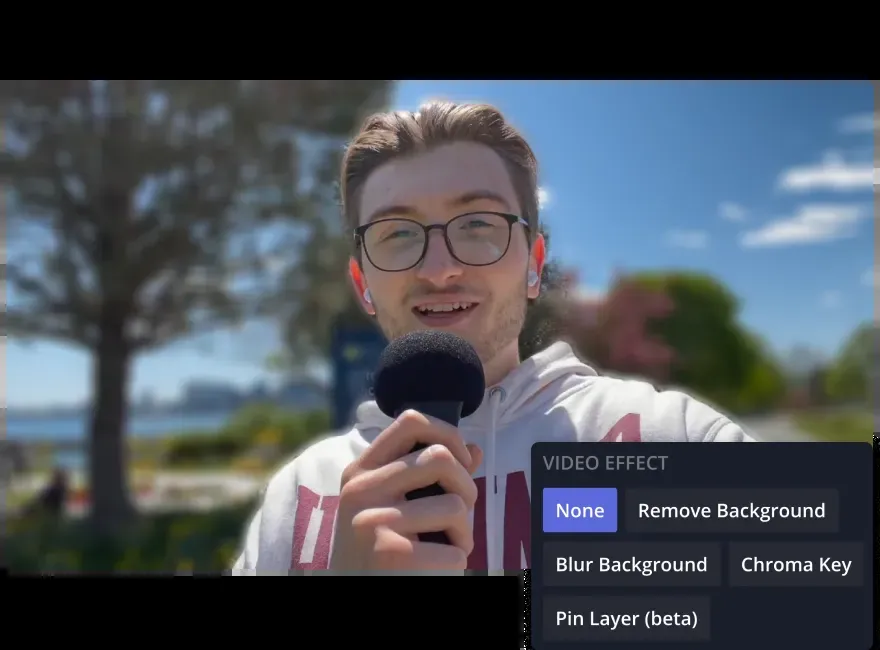 Kapwing's editor: effects like background removal and chroma key, applied by hand on a browser timeline.
Where Kapwing's pricing bites
1. It's per member. Pro is $24 per member/month, or $16 billed yearly ($192/yr). Business is $64, or $50 billed yearly ($600/yr). A three-person team on Business pays $1,800 a year before buying any extra credits.
2. Credits are a monthly allowance. Pro includes 1,000 credits a month and Business 4,000, refreshing on the 1st. Subtitles cost 1 credit a minute and Repurpose Studio 2. Dubbing is 10 credits per 30 seconds, lip sync 30 a minute, AI images 4–6 credits, and AI video 20 and up.
3. Top-ups are Business-only and expire. Extra credits are 500 for $50, available only on Business. Kapwing's help center says they "do not roll over" and are removed at the monthly refresh.
4. The free tier is a demo. It's 10 credits, lifetime, with 720p watermarked exports, a 4-minute export limit, 30 export minutes a month, and storage that's kept for 3 days.
5. No trial of paid plans and no refunds. Kapwing's FAQ says it doesn't issue refunds once you upgrade.
6. Publishing stops at upload. You can share straight to YouTube, TikTok and Facebook, but there's no scheduler and no Instagram, X, LinkedIn, Threads or Pinterest.
Where Shorz is structurally different
- Credits never expire, and there are no seats. 1 credit = €0.01. Packs at €19.90 / €99.90 / €199.90 (same numbers in USD) for 1,990 / 9,990 / 19,990 credits. No member pricing, no monthly refresh, top-ups on any pack with optional auto top-up, and a 7-day money-back guarantee on your first pack.
- A free tier you can actually ship with. Auto Edit and Clipping include 4 free videos a week: full quality, no watermark, no card.
- A brief instead of a timeline. Auto Edit takes your footage and a plain-English description of the edit. It applies captions with 16 word animations, speech- or beat-synced auto-zoom, five B-roll modes (your assets, web images, GIFs, emojis or AI-generated clips), face-tracked 16:9→9:16 reframing, music and sound effects.
- Six entry points. Auto Edit Video, Script to Video (narrated video with consistent characters from a script alone), Avatar (a talking clone from one photo), two-speaker Podcast, Advertisement (product photo to multi-scene ad), and Clipping (one long video into up to 8 captioned shorts).
- It publishes everywhere. Publish or schedule to YouTube, TikTok, Instagram, Facebook, X, LinkedIn, Threads and Pinterest, up to 30 days ahead, and read each post's engagement in the app.
- Local rendering, local library. The final render is GPU-accelerated on your machine, and projects and generated assets stay on disk, not in storage that's cleared after 3 days.
- Thumbnails for 16:9 and 9:16, generated in the same app.
- Agent-drivable. The Shorz MCP server lets Claude, Cursor, Codex or Gemini run whole workflows in plain English.
Side by side
| Shorz | Kapwing | |
|---|---|---|
| Form factor | Desktop app for Windows and Apple Silicon Macs | Browser, any OS (no iOS app; Android paused) |
| Pricing model | Prepaid credits, no subscription, no seats | Per-member subscription |
| Headline price | Packs from €19.90 / $19.90 (one-off) | Pro $24, Business $64 per member/mo ($16 / $50 yearly) |
| Credit expiry | Never expire | Monthly allowance; top-ups removed at refresh |
| Top-ups | Any pack, optional auto top-up | Business only, 500 credits for $50 |
| Free tier | 4 Auto Edit / Clipping videos a week, no watermark | 10 lifetime credits, 720p, watermark |
| Refunds | 7-day money-back guarantee on your first pack | No refunds after upgrading |
| Editing model | Describe the edit; AI assembles | Manual browser timeline + AI tools |
| Team collaboration | No seats, comments or shared workspace | Real-time collaboration, comments, Brand Kits |
| Templates | Not template-driven | Template library |
| Long video → shorts | Clipping, up to 8 clips | Repurpose Studio, sources up to 3 hours |
| Script → narrated video | Yes, with character consistency | Kai agent builds a storyboard |
| Talking avatars | Avatar + two-speaker Podcast types | AI avatars |
| Dubbing | ~108 languages | 149 language options |
| Thumbnails | 16:9 + 9:16 generator | No |
| Publish / schedule | 8 platforms, up to 30 days ahead | Share to YouTube, TikTok, Facebook; no scheduler |
| Rendering | Local, GPU-accelerated | Cloud and browser |
Which one fits your work
Choose Kapwing if several people edit, review and approve the same videos, your brand lives in shared templates and kits, you want to place things by hand on a timeline, or you need it to run on any machine with a browser. Its collaboration is a real advantage Shorz does not have.
Choose Shorz if you're a solo creator or small operation shipping volume, such as a faceless channel, client repurposing, ad variants or a podcast. Shorz fits if you'd rather describe a video than build it, and you want the result posted to eight platforms. It also fits if paying per member for credits that reset every month doesn't match how you work.
The cost crossover. Kapwing bills every member every month whether you export or not. Shorz bills for what you generate, once. Steady multi-person editing favours Kapwing. Bursty output from one person favours Shorz.
Honest limits on the Shorz side
- No collaboration. No seats, shared workspace, comments or brand kits shared across a team. If review rounds are your workflow, Kapwing wins.
- No manual timeline or template library. You steer with briefs and panel settings. For placing every element yourself, Kapwing is the better instrument.
- Windows and Apple Silicon Macs only. No browser version, Linux, Chromebook or Intel Mac build.
- Fewer dubbing languages. ~108 against Kapwing's 149 options.
- AI generation (Script to Video, avatars, AI B-roll) needs credits from the first render. The free weekly videos cover Auto Edit and Clipping.
Verdict
Kapwing is the better choice for a team that edits together in a browser and standardises on templates. Shorz is the better choice for an operator who wants videos built from a brief and published to eight platforms, without paying per seat for credits that reset on the 1st.
See how Shorz replaces the timeline: AI Video Editor for Faster Production
Other comparisons
Weighing more than one option is the sensible way to buy. The same research applied to the rest of the field: