
HeyGen is the default answer when someone says "AI avatar video," and it earned that position. Shorz includes avatar video too — but as one of six ways into a project, inside an app whose real job is turning any input into a finished, captioned, published video.
So the useful question isn't "which has better avatars." It's how much of your video does the tool actually finish?
HeyGen plan details below were taken from its own pricing page in July 2026. Verify before you buy — HeyGen has changed its credit structure more than once.
The one-line version
- HeyGen is a specialist: photoreal avatars, custom digital twins, translation with lip-sync, and a serious enterprise L&D story (SCORM, LMS, SSO).
- Shorz is a generalist production line: Auto Edit, Script to Video, Avatar, Podcast, Advertisement and Clipping, plus the whole finishing stack and publishing to eight platforms.
If your product is a talking head at enterprise scale, HeyGen. If a talking head is one asset type among many you need shipped weekly, Shorz.
What HeyGen is genuinely excellent at
- Avatar fidelity. HeyGen's avatar quality and lip-sync are the benchmark everyone else gets measured against, and its custom digital twins are the most convincing "that's actually me" option on the market.
- Language reach. HeyGen advertises 175+ languages and dialects on paid plans, with translation that re-syncs the lips rather than just dubbing over.
- Enterprise training features. Interactive video, SCORM export, LMS integrations, SAML/SSO, multi-workspace controls and centralized billing. If you're a learning-and-development team, that list matters and Shorz has none of it.
- A real free tier. 3 videos a month, 1-minute cap, watermarked, with access to Avatar IV and one custom digital twin. You can evaluate it for nothing.
- A mature API. Programmatic avatar generation at volume.
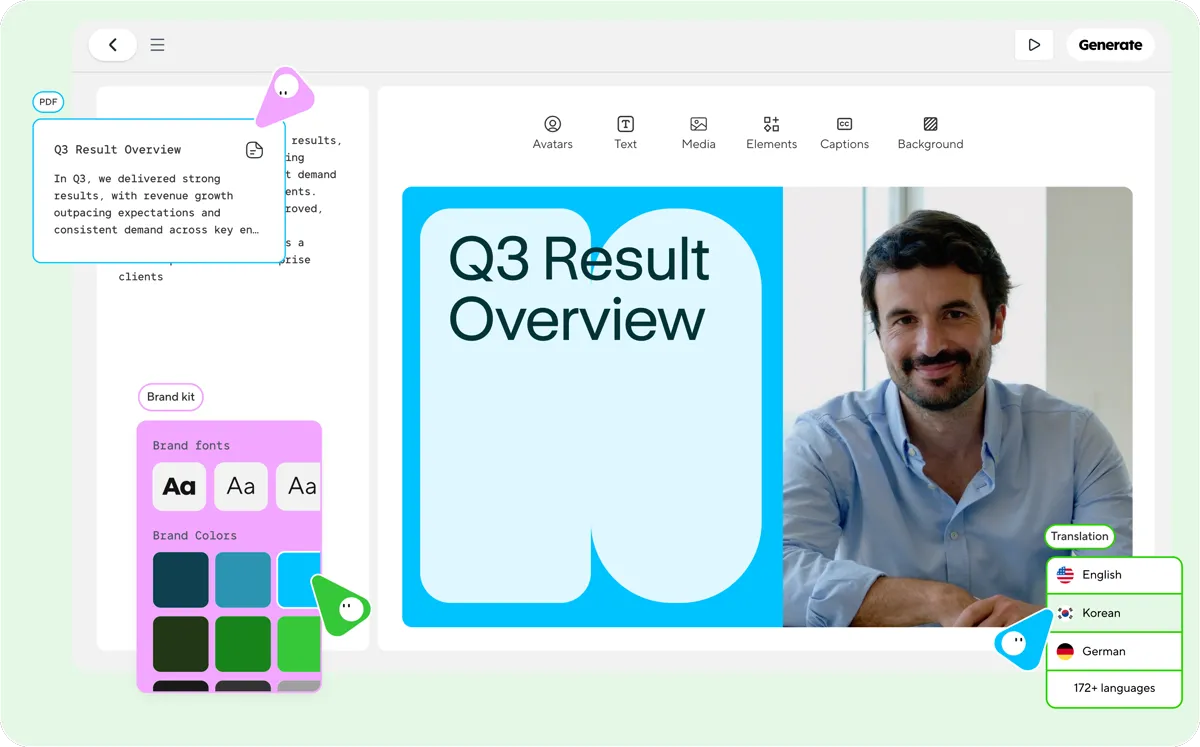 HeyGen's Avatar Studio — brand kit, multi-language translation and avatar controls built around one avatar video format.
Where HeyGen stops
- It is not a video editor. There's no timeline — no control over cuts, pacing or transitions in the way an editor gives you. You get scenes, and reviewers consistently name this as the ceiling.
- The credit system is the number-one complaint. Across G2, Trustpilot and Capterra, confusion over what a credit buys is the recurring theme. Avatar IV is reported at roughly 20 credits per minute — so the Creator plan's 600 credits is a real but finite budget, and heavier features drain it fast.
- Credits don't roll over. Unused credits reset each billing cycle.
- Video length is capped by plan. 1 minute on Free, 30 minutes on Creator and Pro, 60 minutes on Business. Reviewers also report avatar emotional range degrading past about 90 seconds.
- Speed is an upsell. Priority Processing is a separate paid add-on (commonly cited around $15/mo); without it, peak-hour renders on lower tiers can queue for a long while.
- Seats cost extra. Business is $149/mo plus $20 per seat.
- Free API credits ended. From February 2026 the API moved to pay-as-you-go.
- No publishing or scheduling. HeyGen produces the file. Distribution is your problem.
What Shorz does that HeyGen doesn't
Shorz's Avatar project type is competitive on its own terms, and then the app keeps going.
On avatars specifically:
- One portrait photo → a lip-synced talking video, from a script (narrated via ElevenLabs voices) or your own uploaded audio.
- Three avatar engines you choose between: Kling Avatar, Kling Avatar Pro (default) and OmniHuman 1.5.
- Multi-angle presenters. Add up to 3 extra stills of the same person from other angles; Shorz splits the script by sentence and cuts between angles, so the presenter isn't frozen in one pose.
- 20 light-leak transitions available over those cuts, each with its own whoosh, chosen at random per cut — the result reads as filmed and edited rather than generated.
- Scripts up to ~40,000 characters (~6,000 words).
- A two-speaker Podcast type. Tag a script
[Interviewer]/[Interviewee], give each a voice and a photo, and get a conversation-layout video — split-screen or talking-speaker-only, with optional handheld or slow-zoom camera motion. That synthetic-interview format has no clean HeyGen equivalent. - Your own cloned voice via an optional ElevenLabs key. Every other model in the app runs on your Shorz account with no keys to wire up.
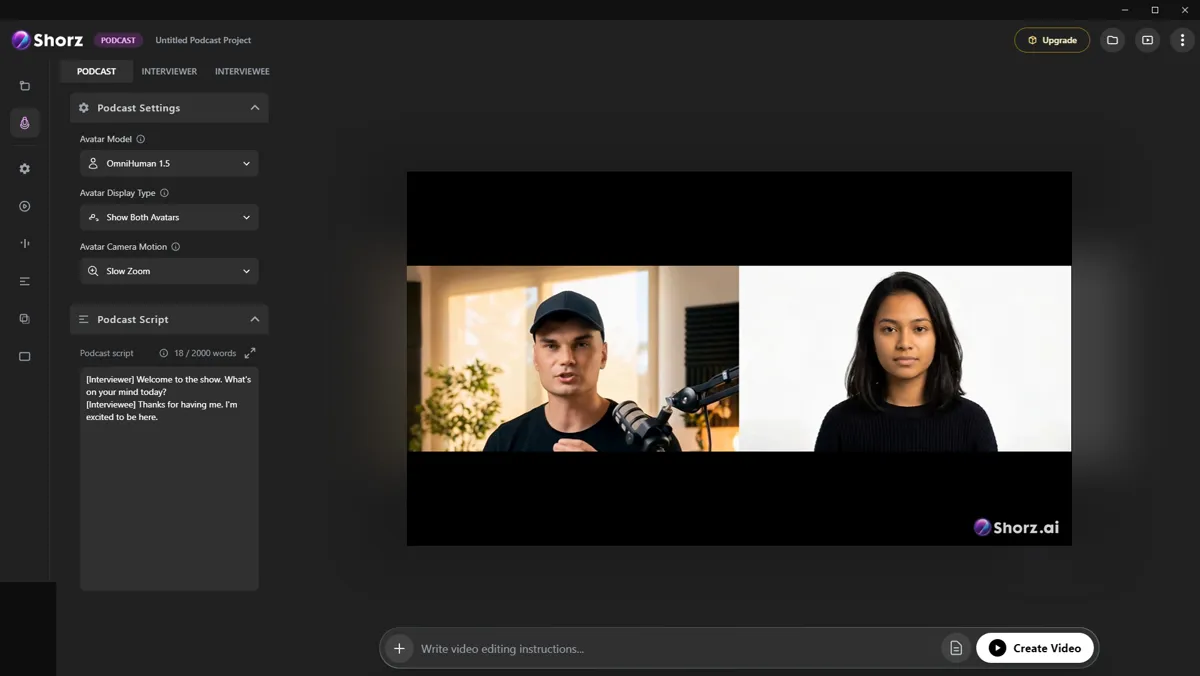 The Podcast project type — avatar model, "Show Both Avatars" display, slow-zoom camera motion, and a script tagged by speaker role, rendering as a split-screen conversation.
Beyond avatars — the part that decides most purchases:
- Five other project types, including Clipping (one long video, local file or a YouTube / TikTok / Facebook / Instagram link, into up to 8 post-ready clips) and Advertisement (a product and/or person photo into a storyboard-driven multi-scene ad, 10–40s in 10-second scenes).
- A finishing stack: auto subtitles with deep styling and 16 word animations, dubbing into ~108 languages, animated titles, animated borders, overlay FX, five B-roll modes, AI music and SFX, a channel mixer with reverb presets, speech-synced auto-zoom, face tracking, and thumbnails for 16:9 and 9:16.
- Publishing built in. Render once, then publish or schedule to YouTube, TikTok, Instagram, Facebook, X, LinkedIn, Threads and Pinterest, up to 30 days ahead, then read per-post engagement inside the app.
- No subscription and no seats. Prepaid credits: 1 credit = €0.01, packs at €19.90 / €99.90 / €199.90 (1,990 / 9,990 / 19,990 credits), credits never expire, one balance across every tool, full commercial rights.
- Local rendering. The final composite runs on your machine with GPU-accelerated encoding — no shared queue, and no add-on to skip it.
- Agent-drivable. An MCP server lets Claude, Cursor, Codex or Gemini create projects, generate assets and run whole workflows in plain English.
Side by side
| Shorz | HeyGen | |
|---|---|---|
| Form factor | Desktop app for Windows and Apple Silicon Macs | Browser / cloud |
| Scope | 6 project types, full finishing stack | Avatar & translation specialist |
| Commercial model | Prepaid credits, no subscription, no seats | $0 / $29 / $49 per mo; Business $149 + $20 per seat |
| Credit expiry | Never expire | Reset each cycle |
| Free tier | 4 Auto Edit / Clipping videos a week — no watermark | Yes — 3 videos/mo, watermarked, 1 min |
| Watermark | Never | On the free tier |
| Avatar engines | Kling Avatar, Kling Avatar Pro, OmniHuman 1.5 | HeyGen's own (Avatar IV, digital twins) |
| Custom likeness of you | Not a feature | Custom digital twins — its strongest card |
| Multi-angle presenter | Up to 3 extra angles, split by sentence | No |
| Two-speaker dialogue | Podcast project type | No |
| Timeline / editing depth | Full finishing stack, plain-language briefs | No timeline |
| Subtitles & styling | 16 word animations, deep styling | Basic captions |
| Languages (dubbing) | ~108 | 175+ |
| Long-video → shorts | Clipping, up to 8 clips | No |
| Video length cap | No plan-tier cap; script cap ~6,000 words | 1 / 30 / 60 min by plan |
| Render priority | Local GPU render | Priority Processing is a paid add-on |
| Publish / schedule | 8 platforms, up to 30 days ahead | No |
| Enterprise L&D (SCORM, LMS, SSO) | No | Yes |
| API | MCP server for AI agents | Public API, pay-as-you-go since Feb 2026 |
Which one fits your work
Choose HeyGen if you need a photoreal digital twin of a specific real person, you're localising one video into dozens of languages with accurate lip-sync, or you're building compliance and onboarding training that has to land in an LMS. Those are its home turf and Shorz doesn't pretend otherwise.
Choose Shorz if the avatar is one deliverable among many. A faceless channel that needs narrated videos and clips and thumbnails. An agency shipping ad variants. A founder repurposing one webinar into a week of posts. You want the video finished and posted, not exported and handed to three more tools.
A common split: HeyGen for the localised flagship explainer, Shorz for the weekly output that feeds the channel.
Honest limits on the Shorz side
- Shorz is a desktop app for Windows and Apple Silicon Macs; no Linux or Intel Mac build. HeyGen runs anywhere with a browser.
- No free avatar videos. Shorz's free tier covers Auto Edit and Clipping only (4 videos a week, no watermark); avatar generation needs credits from the first render. HeyGen's free videos include its avatars — watermarked.
- No custom digital twin of a real person trained from video, and no interactive video, SCORM, LMS or SSO.
- ~108 dubbing languages, not 175+. If breadth of language is the deciding factor, HeyGen wins that row outright.
- No per-seat team workspaces or real-time collaboration.
Verdict
HeyGen is the better avatar platform. Shorz is the better video platform — and for most creators and marketers the bottleneck was never avatar realism, it was everything after the avatar stops talking: captions, B-roll, music, a thumbnail, a schedule, and doing it all again next week.
If avatar video is one thing you need rather than the only thing, start here: AI Avatar Video — or see the wider workflow in AI Video Editor for Faster Production
Other comparisons
Weighing more than one option is the sensible way to buy. The same research applied to the rest of the field: