

OpusClip does one job and does it well: you hand it a long video, it hands back short clips. Shorz does that job too (it's the Clipping project), but clipping is one of six things it does. So the real question is whether you need a clipper or a production app that happens to include one. How each one meters your usage matters just as much.
OpusClip details below were read from opus.pro's pricing page and help center on 7 October 2026. Prices are USD at OpusClip's top regional tier (US, UK, EU, Canada, Australia); it charges less in some countries. Check current numbers before you buy.
The one-line version
- OpusClip is a browser-based clipping engine with a virality score, prompt-based clip selection, a scheduler and a team plan. It's billed by the minute of video you upload.
- Shorz is a desktop app for Windows and Apple Silicon Macs with six project types, Clipping among them, on prepaid credits that never expire, with publishing to eight platforms built in.
What OpusClip is genuinely excellent at
- Clipping is the whole product. Its scoring model ranks each clip's "virality", and ClipAnything lets you ask for a moment in plain language ("the airplane story", "moment most likely to go viral").
- Very long inputs, from anywhere. Videos up to 10 hours, from about 20 sources: YouTube, Google Drive, Vimeo, Zoom, Twitch, Kick, Riverside, Loom, public .mp4 links and local upload.
- Reframing that follows the action, including a gameplay / screen-share layout, plus animated captions in 20+ languages.
- Edit by transcript. Delete words in the text and the cut follows, with filler and silence removal.
- Hands-off pipeline. On Pro it can auto-import new YouTube uploads, clip them and schedule the results to YouTube, Instagram, TikTok, Facebook, LinkedIn, X, Pinterest, Threads and Bluesky.
- Hand-off to a real editor. Pro exports to Premiere Pro and DaVinci Resolve, and includes API access, Zapier and an MCP connector.
- Runs anywhere. Browser on any OS, plus iOS and Android apps.
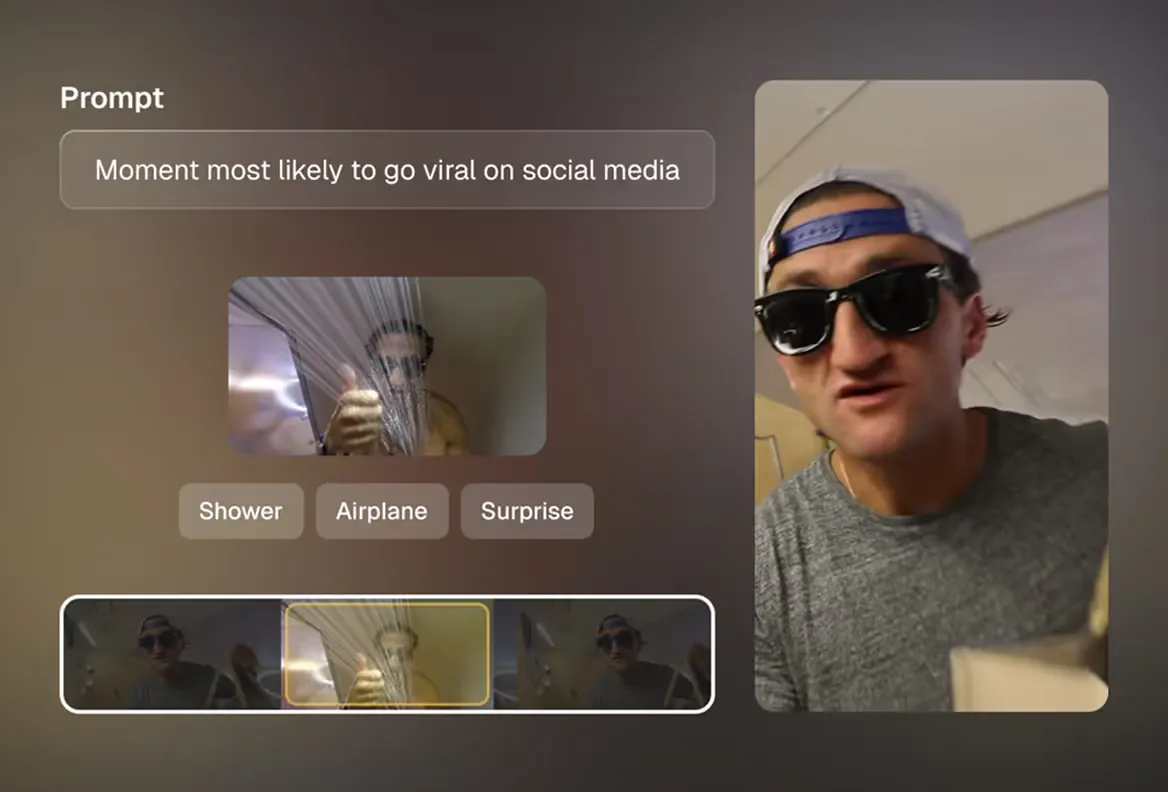 OpusClip's ClipAnything: type the moment you want and it finds it in the source video.
How OpusClip's credits actually work
1. You pay for what you upload, not what you keep. One credit is one minute of uploaded video. A 60-minute podcast costs 60 credits whether you post two clips from it or twenty. Pro's 300 monthly credits cover five hour-long episodes.
2. Credits lapse. On monthly plans unused credits roll over for one month, so each batch expires after about 60 days. Yearly plans roll over for two months. Top-ups (Pro only) last 12 months, and they're locked if you stop subscribing.
3. The prices. Free is $0 with 60 credits, a watermark, and clips you must export within 3 days. Starter is $15/month (monthly only) for 150 credits, with no scheduler and media that expires after 29 days. Pro is $29/month, or $14.50/month billed yearly ($174/yr), for 300 credits a month. That buys the scheduler, dubbing (25 languages, 10 credits a minute), brand templates and up to 4 seats. Business is custom.
4. Free credits are murky. The pricing page says 60 a month. OpusClip's own credits FAQ says the 60 welcome credits "are not replaced once they are spent".
5. Everything is processed on their servers. Links must be public or unlisted, so a private video can't go in until you upload it yourself.
Where Shorz is structurally different
- Credits never expire. 1 credit = €0.01. Packs at €19.90 / €99.90 / €199.90 (same numbers in USD) for 1,990 / 9,990 / 19,990 credits. No subscription, no rollover window, no renewal date. A quiet month costs nothing and the balance waits.
- No per-minute meter on uploads. A Clipping run is billed for the AI work it does, and most of that is a fixed analysis cost, so a long source doesn't scale the bill minute for minute. Shorz's own estimate is roughly 30 credits (€0.30) per short clip cut from a long video.
- A free tier that isn't a trial. Auto Edit and Clipping include 4 free videos a week: full quality, no watermark, no card, sources up to 30 minutes.
- Clipping, done in one pass. A local file or a YouTube, TikTok, Facebook or Instagram link becomes up to 8 post-ready clips with captions, B-roll and auto-zoom applied. Leave the brief empty for fully automatic, or steer it ("only the product demo, 30s each"). Face tracking keeps the speaker centred when 16:9 becomes 9:16.
- Five more project types when clipping isn't the job. Auto Edit Video (describe the edit for any footage), Script to Video (narrated video with consistent characters, nothing to film), Avatar, two-speaker Podcast, and Advertisement.
- Dubbing in ~108 languages, one toggle, versus 25 on OpusClip Pro.
- It publishes. Publish or schedule to YouTube, TikTok, Instagram, Facebook, X, LinkedIn, Threads and Pinterest, up to 30 days ahead, and read each post's engagement in the app. No plan tier gates it.
- Local rendering and a local library. The final render runs GPU-accelerated on your machine, and clips, projects and generated assets stay on disk, so nothing expires after 3 or 29 days.
- Agent-drivable. The Shorz MCP server lets Claude, Cursor, Codex or Gemini run the whole pipeline in plain English.
Side by side
| Shorz | OpusClip | |
|---|---|---|
| Form factor | Desktop app for Windows and Apple Silicon Macs | Browser, any OS, plus iOS and Android |
| Pricing model | Prepaid credits, no subscription | Subscription, credits per uploaded minute |
| Headline price | Packs from €19.90 / $19.90 (one-off) | Starter $15/mo; Pro $29/mo or $14.50/mo yearly |
| Credit expiry | Never expire | Roll over 1 month (monthly) or 2 months (yearly) |
| Free tier | 4 Auto Edit / Clipping videos a week, no watermark, no card | 60 credits, watermark, export within 3 days |
| Watermark | Never | On the free tier |
| Clip selection | Brief-steered or fully automatic, up to 8 clips per run | Virality score + ClipAnything prompts |
| Max source length | 30 min on the free tier | 10 hours |
| Input sources | Local file, YouTube, TikTok, Facebook, Instagram links | ~20 sources incl. Drive, Zoom, Twitch, Vimeo |
| Edit by transcript | No, plain-language briefs | Yes |
| Script → narrated video, avatars, ads | Yes, separate project types | Not in OpusClip (Agent Opus is a separate product) |
| Dubbing | ~108 languages | 25 languages, Pro and up |
| Publish / schedule | 8 platforms, up to 30 days ahead | 9 platforms incl. Bluesky, Pro and up |
| Premiere / DaVinci export | No | Yes, Pro |
| Team seats | No | Up to 4 on Pro, unlimited on Business |
| API / automation | MCP server for AI agents | API, Zapier and MCP connector on Pro |
| Rendering | Local, GPU-accelerated | Cloud |
Which one fits your work
Choose OpusClip if clipping is the entire job, your sources are long (multi-hour streams, webinars, Zoom recordings), you want a virality score to triage dozens of candidates, you hand finished cuts to an editor in Premiere or DaVinci, or you're on Linux, a Chromebook or a phone.
Choose Shorz if clipping is one part of a bigger output: the same week includes a narrated Short, a product ad and an avatar explainer. Shorz also fits if your output is bursty and you're tired of watching credits expire. You get four free clipping runs a week to test it, a 7-day money-back guarantee on your first pack, and a balance that doesn't lapse after that.
The cost crossover. OpusClip bills every uploaded minute, used or not, and takes back what you don't spend within a month or two. Heavy, steady clipping of long sources suits OpusClip's Pro plan. Irregular output, or output beyond clipping, suits Shorz.
Honest limits on the Shorz side
- Windows and Apple Silicon Macs only. No browser version, no phone app, no Linux or Intel Mac build.
- No virality score and no transcript editing. You steer clips with a brief, not by deleting words.
- Up to 8 clips per run. If you want 30 candidates from a three-hour stream, OpusClip is built for that.
- No team seats or NLE export. Shorz is built for one operator, and it doesn't hand projects to Premiere or DaVinci.
- Fewer input sources. Drive, Zoom, Twitch and Vimeo links have to be downloaded first.
Verdict
OpusClip is the better pure clipper for long streams and teams that live inside a clipping dashboard. Shorz is the better choice when clipping is one part of everything else you publish. It has credits that never expire, no per-minute meter, five more project types, and publishing to eight platforms from the same app.
See the Clipping workflow in detail: AI Video Clipping
Other comparisons
Weighing more than one option is the sensible way to buy. The same research applied to the rest of the field: